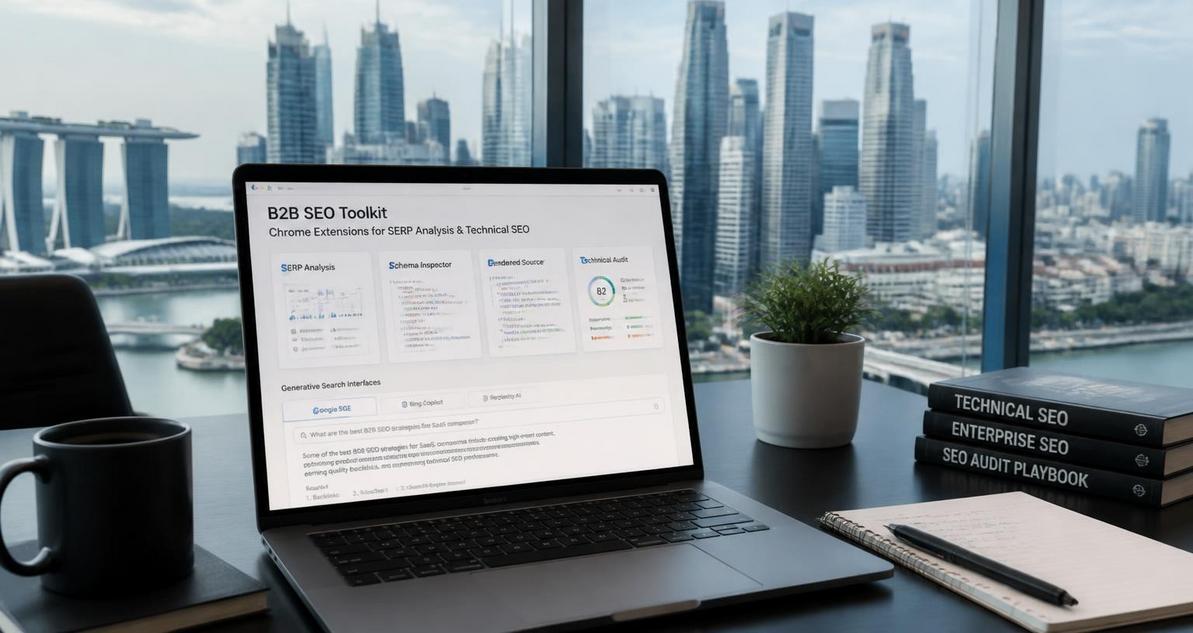
Generative search is changing how SEOs inspect visibility, diagnose page performance, and validate content against answer engines that synthesize results instead of simply ranking blue links. For teams operating in Singapore and the Philippines, this shift matters because local competition is dense, mobile usage is high, and buyers often research across multilingual, cross-device journeys before they ever contact sales. That means SEO workflows now need faster SERP inspection, better on-page diagnostics, cleaner structured data validation, and tighter content QA across multiple surfaces, including Google Search, AI Overviews-style experiences, and browser-based research. Chrome extensions fill that gap because they sit directly in the workflow where analysts, strategists, and technical SEOs are already working. Used well, they shorten the time from observation to action and make generative search optimization much more operational.
Why Chrome extensions matter in generative search workflows
Generative search surfaces are not just another SERP feature. They compress several layers of retrieval, synthesis, and citation into a single interface, which changes how SEOs evaluate intent matching and topical authority. A typical ranking report no longer tells the full story, because a page can influence an answer engine without holding the first organic position. Chrome extensions help you inspect the page, the query, the rendered DOM, the structured data, and the visible copy in one browser session, which is critical when you need to understand why a page is surfaced, cited, or ignored.
For B2B teams in Singapore and the Philippines, this matters in practical terms. Decision-makers often search for vendor comparisons, compliance guidance, pricing patterns, implementation documentation, and technical proof points. Generative search tends to reward pages that are well structured, semantically clear, and easy to parse. If your team is auditing a product page, a solution page, or a technical blog post, extensions can reveal whether your metadata, schema, internal links, headings, and copy hierarchy support retrieval and citation. They also reduce friction for distributed teams, especially when marketing, SEO, product, and development need a common diagnostic workflow.
What generative search changes for SEO analysis
The most important shift is that retrieval quality now matters as much as rank position. Answer engines need entities, relationships, and context, so pages with weak information architecture often underperform even if they target the right keyword. Extensions that inspect structured data, on-page semantics, and technical signals let you test whether a page is eligible for machine interpretation. That is especially useful for enterprise sites with many templates, multilingual sections, or heavy JavaScript rendering.
Extensions for SERP analysis and prompt-aware research
Before you optimize a page, you need to understand what the search environment is doing. Chrome extensions that support SERP analysis are useful because generative search is still query dependent. The same brand, product, or category term can trigger different layouts, citation patterns, and intent interpretations depending on geography, device, and search history. A strong research stack helps you isolate those variables.
SEO Minion for SERP observation and page checks
SEO Minion remains useful because it gives quick access to on-page audits, broken link checks, hreflang inspection, and SERP highlighting. For generative search workflows, the value is not just convenience. It lets analysts move from a query to a page-level inspection without switching tools. If you are reviewing a content cluster for a SaaS company serving Southeast Asia, you can inspect title tags, headings, canonical tags, and hreflang implementation directly while comparing competitor pages. That helps you identify whether your page architecture supports region-specific intent.
In practice, this is valuable for Singapore and Philippines campaigns where English pages may need local nuance but should still remain consistent with a broader APAC content model. You can also use its SERP highlighting to see whether your target terms are appearing in snippets or if the page is being expanded into a more conversational answer format. This is a useful first pass before deeper technical diagnostics.
Detailed SEO Extension for rapid SERP and metadata auditing
Detailed SEO Extension is one of the cleanest utilities for checking core on-page elements. It shows title tags, meta descriptions, canonical URLs, meta robots directives, headings, images, and structured data in a compact format. For generative search, this matters because the easiest pages for answer engines to interpret usually expose clear signals at the HTML layer. When you compare multiple pages in a competitive set, this extension helps you see whether your competitors are using concise titles, semantic H1 structures, and schema markup more effectively than you are.
Use it to review pages that are intended to win informational or mid-funnel queries. If a page has a strong title but vague subheadings, weak body segmentation, or missing schema, it may still rank but fail to support generative citations. Detailed SEO Extension helps you catch those issues quickly during content QA.
Keyword Surfer for lightweight query expansion and intent checks
Keyword Surfer is still useful for fast ideation and query expansion because it surfaces related keywords and estimated search volume in the browser. Although generative search reduces dependence on exact-match targeting, query variation still matters because answer engines map intent across phrasing patterns, entities, and modifiers. This is particularly important in B2B markets where users search by problem, product category, integration, compliance requirement, or use case.
For example, a fintech vendor in the Philippines may need to understand whether users search for fraud detection software, transaction monitoring tools, AML solutions, or compliance automation. Keyword Surfer helps you see how that language clusters around the page you are studying. That can inform your content brief, internal linking, and FAQ design without forcing you to leave the browser.
Extensions for technical SEO and structured data validation
Generative search systems rely heavily on machine-readable signals. If the page is technically messy, the content may still be useful to humans but harder for retrieval systems to parse. This is where technical extensions become essential. They help you validate schema, inspect redirects, examine indexability, and understand how browser-rendered content differs from the raw source. That is especially important for enterprise websites built on JavaScript frameworks, CMS templates, or internationalization layers.
Schema Builder and schema inspection tools
Any extension that helps inspect JSON-LD, Microdata, or RDFa is valuable, because structured data can improve machine comprehension of the page’s entities and content types. For generative search, schema is not a magic ranking lever, but it helps clarify the meaning of the page. Product pages, organization pages, FAQ pages, article pages, and service pages all benefit from clean schema relationships. A schema inspection extension allows you to verify whether the markup is present, valid, and aligned with visible content.
Use schema tools when launching new pages or refreshing legacy content. In B2B environments, especially for managed services, cybersecurity, cloud, and logistics providers, the content often spans complex service definitions. Structured data can help explain which entity is the brand, which is the service, and which is the supporting article or case study. That level of clarity improves technical confidence during QA.
View Rendered Source and Web Developer for rendered DOM analysis
Many generative search issues are really rendering issues. If important copy is injected client-side, hidden behind tabs, or loaded after initial render, crawlers and answer engines may treat it differently from visible content. View Rendered Source helps compare the initial HTML with the rendered output, while Web Developer provides controls for inspecting images, outlines, styles, forms, and metadata. Together, they help you diagnose whether the browser view matches what search systems can reliably parse.
This is especially relevant for single-page applications and heavily scripted marketing sites. If your key value proposition, internal links, or product specs are not present in the rendered DOM, they may not be processed as intended. These extensions are most useful when paired with Google’s own rendering logic in tools like Search Console URL inspection, but they let you identify issues much earlier in the workflow.
Redirect Path for canonical and redirect chain checks
Redirect Path is a practical extension for tracing redirect chains, status codes, and canonical behavior. Generative search relies on clean URL resolution, because ambiguity in canonicalization can dilute signals across duplicate pages, parameterized URLs, and regional variants. If your site uses separate paths for Singapore and Philippines audiences, or if product pages are duplicated across languages, redirect hygiene becomes critical.
Use Redirect Path to check whether the final URL is stable, whether there are unnecessary hops, and whether canonical logic aligns with your indexation strategy. When pages oscillate between variants, the confidence of both crawlers and answer engines can suffer.
Extensions for content optimization and entity alignment
Content quality still drives visibility, but generative search raises the bar for precision. Pages need to reflect entities clearly, answer questions directly, and support related concepts with a coherent semantic structure. Chrome extensions can help you review this faster, especially when you are working on large editorial programs or product-led content strategies. The goal is not just keyword coverage. The goal is to make the page easy to interpret, cite, and connect to a broader topical graph.
Grammarly and LanguageTool for clarity and precision
Writing quality affects comprehension. While grammar tools are not SEO tools in the strict sense, they are useful when you are editing content intended for retrieval engines and senior decision-makers. If a page is cluttered with vague phrasing, passive constructions, or grammatical noise, it can weaken topical clarity. Grammarly and LanguageTool help you tighten sentence structure, reduce ambiguity, and standardize tone across content teams.
For multilingual business environments in Singapore and the Philippines, this also helps maintain consistency in English-language content that may be reviewed by regional stakeholders. Clear copy improves readability for humans and can reduce semantic confusion for systems that rely on clean text signals.
Similarweb and user-flow awareness
Similarweb’s extension can provide directional context on traffic sources and audience behavior for competitor sites. It is not a replacement for analytics, but it can support competitive intelligence when you need to understand broader acquisition patterns. In generative search work, the value is strategic. If competitor content is attracting direct traffic, referral traffic, or search traffic across multiple content types, it can indicate which pages are authoritative enough to be surfaced or cited.
Use it alongside manual inspection of content depth, internal linking, and page architecture. That gives you a more complete picture of why some pages become trusted references while others do not.
How to build a practical Chrome extension stack for generative search SEO
The best stack is not the one with the most extensions. It is the one that matches your workflow, avoids overlap, and speeds up decisions. A lean stack for generative search SEO usually includes one SERP analysis tool, one on-page audit tool, one structured data inspector, one rendering or technical inspection tool, and one writing or QA tool. That combination gives you coverage across discovery, diagnosis, and execution without cluttering the browser.
Recommended workflow for B2B SEO teams
- Start with SERP analysis to understand the query environment, competitor layouts, and intent variations.
- Inspect metadata, headings, and structured data directly on the page.
- Compare rendered content with source HTML to catch JavaScript or template issues.
- Review canonical tags, redirect paths, and hreflang if the site serves multiple regional versions.
- Use writing or grammar extensions to polish content before publishing.
- Recheck the page after deployment to confirm that the visible content matches the technical signals.
This workflow is especially effective for content teams working with developers, because it creates a shared diagnostic language. Instead of saying a page “looks fine,” you can point to the exact issue, whether it is a missing schema type, a canonical conflict, or a render discrepancy. That level of precision is what makes generative search optimization repeatable.
Implementation checklist for SEOs optimizing for generative search
- Audit your current Chrome extension stack and remove duplicate tools that slow down analysis.
- Standardize one tool for SERP observation, one for on-page auditing, and one for structured data inspection.
- Review your highest-value pages, especially service pages, comparison pages, product pages, and thought leadership assets.
- Check whether headings, entity references, and metadata align with the query intent you want to capture.
- Validate that key content is visible in rendered HTML, not only in client-side scripts.
- Inspect structured data for accuracy, completeness, and alignment with visible page content.
- Verify canonical tags, redirect chains, and hreflang behavior across regional variants.
- Use browser-based QA before and after publishing to confirm that changes are reflected correctly.
- Document findings in a shared workflow so SEO, content, and development teams can reuse the same checks.
- Revisit your browser stack quarterly as generative search interfaces and rendering behavior continue to evolve.
For brands in Singapore and the Philippines, the real advantage comes from operational discipline. Chrome extensions will not replace strategy, content quality, or technical architecture, but they will make those functions faster to inspect and easier to align. That matters when your team is competing in markets where search demand is sophisticated, buying cycles are research-heavy, and generative interfaces are changing how authority is detected and displayed.

I am Tricia Huang Mei, an Advertising Partner in Sotavento Medios with over two decades of experience in the Singapore advertising and business sectors. My career is defined by a commitment to driving high-impact marketing campaigns and fostering sustainable growth for the diverse business portfolios I manage.